IT documentation that stays yours.
Structured docs for every client, site, and device. A lightweight, open-source alternative to Hudu and IT Glue for internal IT teams and MSPs. Self-host it with one compose file; your credentials never leave your own vault.
# 60-second install
git clone https://github.com/joshhearne/trove-kb.git
cd trove-kb
cp .env.example .env  # POSTGRES_PASSWORD, DATABASE_URL, AUTH_SECRET
docker compose up -d   # http://localhost:3080 → create the first admin
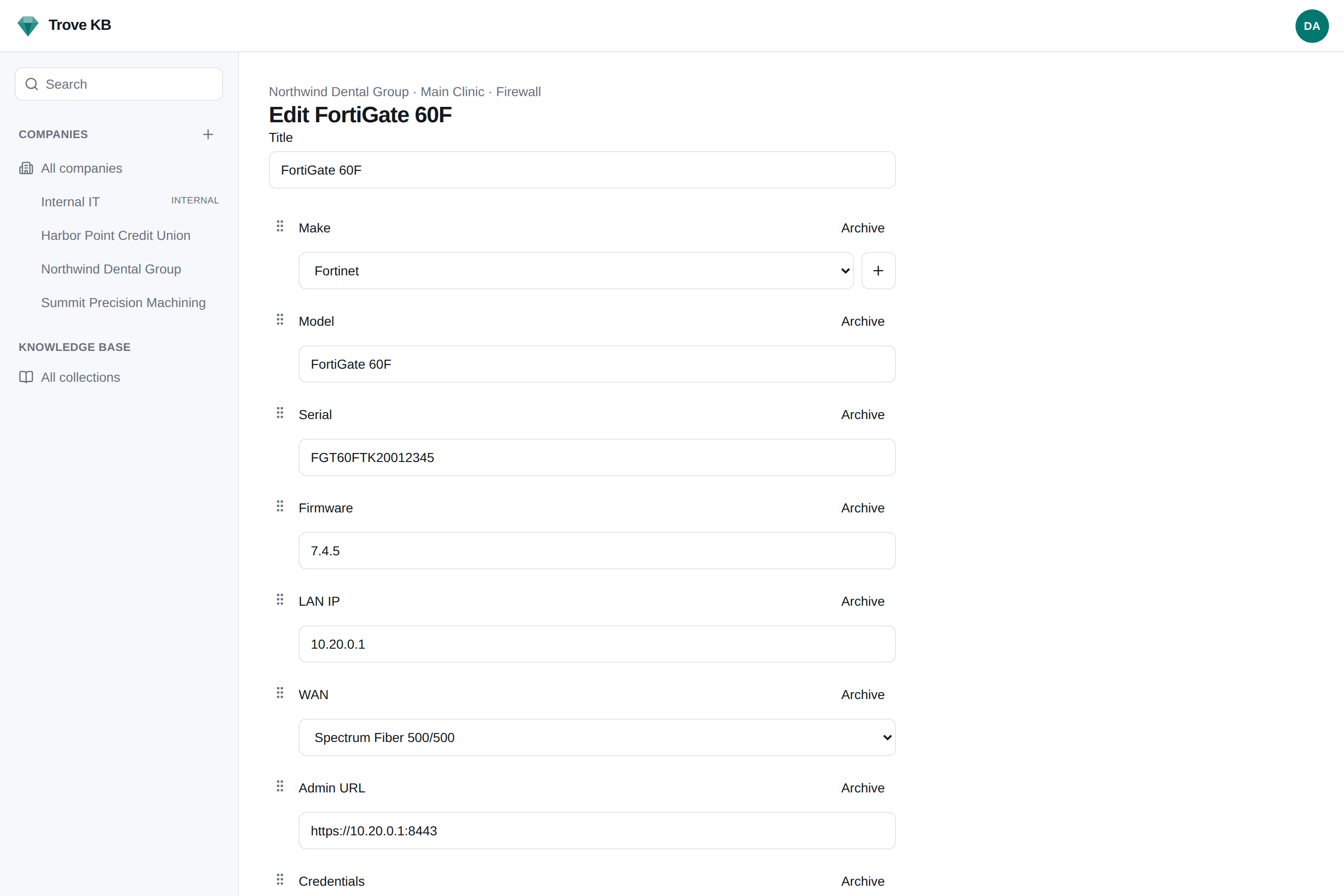
Everything an MSP documents, in one place.
Built for the team that documents forty clients' firewalls and would like the fortieth to take as long as the first.
Companies, locations, documents
Every client is a company, every site a location, every firewall, circuit, tenant, and printer a document built from a typed template. The sidebar is the documentation; admin lives behind the avatar.
Learn moreInline editing, no round trips
Add a field, add a dropdown option, reorder fields, all from inside the document you are editing. Promote a one-off field to the template when it earns it. Nobody has to leave to ask an admin.
Learn moreKnowledge base
Vendor help centers, wikis, and manuals imported or crawled on a schedule, searched beside your own docs. Runbooks whose steps a ticketing system can track. A public site for the collections you choose, with your name on it and each customer placed with their own.
Learn moreCredentials stay in your vault
Trove KB never stores a password, TOTP seed, or secure note. A secret field is a reference into Bitwarden, Vaultwarden, 1Password, or HashiCorp; reveals are fetched live, permission-checked, and audited.
Learn moreREST API + signed webhooks
Everything the app does, over /api/v1 with bearer keys and an OpenAPI spec generated from the same Zod schemas. HMAC-signed webhooks with retries. External refs and a /lookup so any PSA can find its client.
Learn moreMCP for AI assistants
An assistant can ask "what is the firewall admin URL for this client?" and get it from your documentation. Secret fields are stripped from every response and there is deliberately no reveal tool.
Learn moreRack elevations
A Rack document draws itself: mount the Switch and Server documents you already have, get a printable SVG per face, color by equipment kind with per-client overrides, and a warning when two things claim one unit.
Learn moreDomain checks
DNS, TLS expiry, the registry's RDAP record, SPF, DMARC, DKIM posture, and the website's own branding per domain record. Run on request and on a schedule set in three layers; webhooks name what changed and warn once per expiry date. Findings are offered with a "Use this" button, never applied silently.
Learn moreLinks, backlinks, search
A firewall's WAN is a link to the ISP document, and the ISP shows what links to it. Full-text search across every document from Postgres alone. Shared lists for registrars and providers so nobody re-creates Cloudflare forty times.
Attachments, typed by their bytes
Images, PDF, Office, CSV, Markdown on a local volume, an NFS share, or any S3 bucket. HEIC photos become JPEG on the way in. Macro-enabled Office refused. Downloads served as attachments with nosniff.
Learn moreReview schedules
A certificate that expires once, a UPS battery that comes round every two years. Lead times, an Admin → Notifications list of what is due, and a document.due webhook announced once per date.
Per-company access, MFA, audit
Roles are sets of permissions; add your own under Admin → Roles. A user or key sees every company or only the ones granted, and out of scope is "not found", never "forbidden". Authenticator apps, passkeys, recovery codes. An append-only audit trail.
Learn moreSecrets are not our business.
Most documentation platforms hold your clients' passwords in their own database. Trove KB holds a reference and asks your vault when somebody with the permission clicks reveal. A compromised documentation host should not be a compromised client.
- →Link mode needs nothing running: a secret field is a deep link into the web vault.
- →Brokered mode runs the official Bitwarden CLI as a sidecar with no published port. Search, reveal, TOTP, create an item from a doc.
- →1Password Connect and HashiCorp KV providers, and more than one vault per instance, because an MSP inherits whatever each client already uses.
- →Never in a revision, an export, a webhook, a search index, a log, or an MCP response. Every reveal is audited.
"provider_id": "…",
"item_id": "bw-item-id",
"collection_id": "bw-collection-id",
"label": "Firewall admin",
"username": "admin",
"uri": "https://10.0.0.1"
}
▸ no TOTP seed
▸ no secure note
▸ reveal → vault, live, audited, Cache-Control: no-store
app: node 22, next standalone
db: postgres:16-alpine
bw-serve: optional, --profile vault
▸ volumes: pgdata, uploads (local, NFS, or S3)
▸ cpu + memory limits in the file
▸ no Redis, no queue, no search service
Boring stack. On purpose.
One container and Postgres. Webhook retries run from a worker inside the app. Full-text search is a tsvector column. Nothing to operate that you do not already know how to operate.
- →Next.js + TypeScript — One deployable for the UI and the API. Strict types everywhere.
- →Postgres 16 — JSONB field values, tsvector search, the audit log. pg_dump is the backup.
- →Drizzle + Zod — Typed schema and migrations. The same validators generate the OpenAPI spec.
- →Better Auth — Local accounts with Argon2id, OIDC for Entra, Google, Authentik, Keycloak.
- →TipTap + dnd-kit — Markdown and rich text in one editor. Drag handles on every field.
Or run it with no server at all: the same code deploys as a Cloudflare Worker with Postgres behind Hyperdrive, attachments in R2, and retries on a Cron Trigger. Same schema, same hashes, move between them.
Free. As in AGPL.
No seat cap, no tier, no sales call. Run it for yourself, run it for your clients, change it, and share the source if you offer it as a service.
On your own hardware.
A VPS, a homelab, the box in the office closet. Put it behind a Cloudflare Tunnel and nothing is open to the internet. Attachments on the NAS if you like.
- ✓ Starter doc types for ISP, firewall, switch, Wi-Fi, server, domain, tenant, vendor
- ✓ pg_dump and a tarball is the whole backup
- ✓ en-US and en-GB, switchable per reader
No server at all.
Postgres behind Hyperdrive, attachments in R2, webhook retries on a Cron Trigger. Keep brokered secrets by leaving the vault sidecar on your own network behind Access.
- ✓ npm run cf:build && npm run cf:deploy
- ✓ Same schema and hash format as the container
- ✓ Public knowledge base on its own hostname